






















Please login to continue
Continue shopping sign in
Discount

Discount

Discount

Discount

Discount

Discount

Discount

Discount

Discount

Discount

Discount


ลำโพงปาร์ตี้ไร้สาย XV800 X ซีรีส์
Model:
SRS-XP
19,990 THB
1
1. Prices indicated refer to Suggested Retail Price which includes VAT and may change from time to time without prior notice.
Point:
600
2
2. Points indicated is based on purchase amount and may change from time to time without prior notice.
รับสิทธิ์แลกซื้อสินค้าชิ้นที่ 2 - Purchase With Purchase
- Overview
- Online Shopping FAQ
- Features
- Specifications
- Highlight
- Support
-
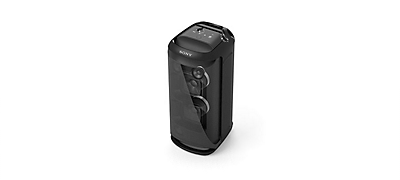
Overviewลำโพงไร้สายที่ทรงพลังนี้จะให้คุณสมบัติที่สมดุลเพื่อให้ตรงกับทั้งความต้องการของปาร์ตี้หรือความบันเทิงของคุณ ในปาร์ตี้ คุณจะสนุกไปกับเสียงปาร์ตี้รอบทิศทาง คาราโอเกะและการควบคุมแบบสัมผัสที่ใช้งานง่าย และที่บ้าน คุณจะยกระดับความบันเทิงได้ด้วย TV Sound Booster
-
Online Shopping FAQ


Questions about your Account
Q. What is a Sony Store account?
A. Your Sony Store account qualifies you for membership with the My Sony program, and upon purchasing THB 5,000 in a month, you will also automatically qualify for the Sony Store Members program. Your account is what you use to sign in to Sony online services such as buying products online, lodging a product support request, receiving emails, participating in competitions or events and providing feedback about your products or these services. It makes your experiences with Sony more personal and relevant to you.
Q. How do I sign up for an account?
A. It is a free and easy process. Simply visit our registration page, key in your particulars and click on “Sign Up” to register. Please ensure that we give absolute priority to the security of your personal and financial information. For more details, please refer to our Privacy Policy.
Q. How do I log into my account?
A. Please visit our sign in page, key in your registered email address and password, and you are logged in. Forgot your password? No worries, click the forgot password option and follow the prompts.
Q. How can I change my registered email address?
A. Please log in to your existing account and click on “Edit Profile” to update your details.
Q. How do I reset my password?
A. Forgot your password? No worries, simply visit our login page, click the forgot password option and follow the prompts to reset your password. You may also log in to your existing account and click on “Edit Profile” to reset your password.
Q. What are some tips about passwords, privacy and safety?
A. Here is some information about passwords and privacy.
To keep your account safe, we recommend a series of password strengthening measures. Your password will need to be:
- 8 to 20 characters long
- One lower case letter
- One upper case letter
- One number
- One special character
- No spaces
Tips for your personal safety:
- Don’t use personal information or common words as a password
- Keep your passwords secure
Q. What can I save in my Account?
A. Currently you can save your favourite details such as delivery addresses and wishlist to make your online purchase easier. If you do not mind filling in further details of your advanced profile settings, we would be better able to deliver a customized experience to you based on your needs & wants.
Q. Can I save my delivery addresses?
A. Yes! You can save your preferred delivery addresses in your account section. Prefer a gift to be delivered to your home address? Or, headphones delivered straight to your workplace? It's easy! Simply keep these details saved to your account to help you speed through the checkout process.
Q. Can I save my contact details?
A. Yes! Your own account section will keep all your details in one place, so you can find them at your fingertips. Should you need to edit any details, click on “Edit Profile” to update your details.
Q. Is my information secure?
A. Absolutely, best practices have been used to make sure your information is secure at all times. Kindly refer to our privacy policy for more details.
Questions about your Orders
Q. How do I know if my purchase has been confirmed?
A. Upon confirmation of your order, you will receive a confirmation email with the order number. Should you not receive this email confirmation, please contact us for more assistance.
Q. Can I see the status of my order in My Account?
A. Absolutely! Simply log in to your account and check out your existing orders under the “My Orders” section. Orders that have been shipped out will have a tracking number available.
Q. How do I track my order?
A. When your order has been shipped out, you will receive an email with your tracking number and order number, so keep an eye on your inbox. You may also get a call from our delivery team. Should there be any questions, please contact us and provide us with your tracking and order numbers.
Q. How do I add items to my cart?
A. Simply find the product that you wish to purchase and use the "Add to Cart" button. Items that are sold out may not be able to be purchased and will display a "Sold Out" badge. You can also proceed to your cart and update the quantities, or remove items, from your order.
Questions about Payment
Q. What payment methods are accepted?
A. To bring you the best online shopping experience, we offer multiple payment methods:
- Credit Card
- Debit Card
- 0% Installment Payment Plan (applicable for SCB Bank, Krungsri Bank, KTC and Bangkok Bank currently)
- iBanking
- Bank Transfer
Q. Will I receive communication of my payment status?
A. An email notification on whether your payment was successful will be sent to you once your order has been confirmed and verified.
Q. Will my credit card details be stored in My Account?
A. As we give absolute priority to the security of your personal and financial information, we do not request for you to store your credit card details nor do we store them.
Q. Which credit cards are accepted for payment?
A. Sony Store, Online accepts all major credit cards supported by VISA and MasterCard.
Questions about Returns & Refunds
Q. Can I change/return my purchased product?
A. Should you not be satisfied with the purchased product or you've received your order wrongly, please check out the returns process below:
- All products must be purchased from Sony Store Online (Thailand). Receipt / tax invoice with the trackable order number is required.
- Returns and/or exchanges are only available for products that are deemed to be damaged in transit (ie: before you received it). In case of defective or out of order goods, goods return must be done within 7 days of receiving. After 7 days, goods return will not be accepted.
- Products must be returned in the original packaging, and should include any free gifts, warranties, manuals, and other accessories that came together with your item.
- Shipping and handling fees cannot be refunded unless a replacement item is shipped out due to being damaged in transit, or faulty when opened.
- In case of refund, it will be based on value of the product at the date of sale only (per the price on the receipt).
REMARKS: The company reserves the right to refuse any goods return or refund if the case does not meet the above requirements.
Q. How soon can Sony process my return request?
A. You will receive a response from Sony within 3 working days.
Q. How do I get a refund?
A. If deemed faulty or damaged before you received your order, Sony will happily replace your purchase with a new item. No additional shipping charges will be added to your order and we’ll help arrange for the replacement to be shipped back to us.
If you would prefer us to refund you, please contact us within 7 days after you've received the product to provide us the details for refund according to Sony's terms and conditions.
For items where an incorrect colour, style or model has been delivered, as long as the item is in its original packaging, Sony will provide an exchange. No exchange will be issued until the item has been returned and inspected, according to Sony’s return policy.
Q. What if I change my mind?
Please choose carefully as refunds and returns are not provided for change of mind.
Q. Will my redeemed points be refunded if I cancel my order?
A. The redeemed points of your purchase will be fully refunded to your member account when the products and services are cancelled. Terms and conditions apply.
Questions about Delivery
Q. How much does delivery cost?
A. For any purchase from Sony Store Online (Thailand) of 2,000 baht and above, delivery fee is FREE regardless of the size of the item, be it TV or an audio device.
Q. Can I get my delivery left at my doorstep or hidden somewhere at the door?
A. To ensure that you get the parcel safely and to avoid any damages to your parcel while it is left unattended, we require a signature when our friendly delivery team comes to your house.
Q. Do you ship overseas?
A. Shipping is only available to customers within Thailand only.
Q. What is the expected delivery time?
A. We are usually able to dispatch your items within 3 working days, if items are in-stock and fully paid. Orders received on Saturday and Sunday may take longer as it will only be processed on the next working day.
During sale/promotion period, we may experience a huge influx of orders which may mean a delay. Please allow us to dispatch your items usually within 5 working days.
REMARKS: Should payment not be cleared, there may be a delay on delivery of your order.
Q. What notifications will I get about delivery?
A. Tracking and order numbers will be provided to the email address registered in your account.
Q. What should I do if I have not received my item?
A. Please contact us and provide us with your tracking and order number.
Q. I ordered multiple items, but I only received partially. Where are my other items?
A. Please contact us and provide us with your tracking and order number.
Q. Can I prearrange the date I want to receive my delivery?
A. We apologize that we are unable to accommodate specific delivery time requests at the moment. If you are not available at the time of your delivery attempt, our delivery team will try to re-deliver to you at another time. However, in the case of more than 2 unsuccessful delivery attempts, shipping fee will be charged for the next attempt.
Q. Do you deliver during weekends and holidays?
A. Our delivery team may attempt deliveries during the weekend, and on some holidays. However, if you are not available at the given address on the weekend, please contact the delivery staff who would have contacted you before the parcel is delivered.
Q. I have already ordered but need my order now, can Sony speed up the delivery?
A. Unfortunately, we are unable to expedite the delivery of orders. However, we will in our best effort deliver your parcel within the indicated delivery time.
Q. Can Sony deliver the items to my office?
A. Yes, we will deliver your order to the address you provided during checkout, regardless whether it is your home address or office address, as long as it is within Thailand.
Q. What if I am not at home when the package arrives?
A. If you’re unavailable to receive your package when it arrives, the delivery team will attempt to re-deliver it to you on the next working day. Please note that it is currently not possible to request for a specific delivery day and/or timing (even for re-deliveries).
Q. My goods were damaged while being delivered, what do I do?
A. We understand the disappointment in opening a new product only to see it broken. Please refuse to accept the product from the delivery staff immediately once you notice that the product packaging has some defects and please contact us right away.
Questions about your Wishlist
Q. What is my Wishlist?
A. Your wishlist allows you to save and share your favourite Sony products to view and purchase later.
Q. How do I view or use my Wishlist?
A. In your account section, you will be able to save your favourite Sony products by clicking on the “heart-shaped” icon. This feature will make it easy to shop and come back to your favourites later.
Questions about Products
Q. How do I get my product repaired?
A. You may return goods we have delivered to you for repair by contacting our service team here. We understand that sometimes large items (TVs & stereos) cannot be shipped easily so our service team will happily arrange an inspection.
Sony will assess and repair products within a reasonable time. This time frame will be communicated via the service team but may vary due to part availability or fault diagnosis. Where possible, all fees (labour, freight, assessment) will be communicated for purchases not covered by manufacturer’s warranty. Where a fault is not found, there may be a service fee involved.
Q. What happens to my data on a product that is repaired?
A. Please ensure, where possible, all data is backed up on recordable media (flash drives, computer hard drives, camera memory cards, mobile phone contacts. Depending on repair requirements, some data may be lost. Sony is not liable for any data not backed up.
Q. Are these products locally sourced, or parallel imported?
A. All products sold through Sony Thai Co., Ltd. are authentic and sold directly from the manufacturer and are not parallel imports.
Questions about Coupon Codes
Q. Can I use multiple coupon codes on the same order?
A. You are only able to key in one coupon code per order.
Q. How long is the coupon code valid for?
A. It varies. The expiration date of the coupon code will usually be indicated and communicated clearly.
Q. Can I use a coupon code for my existing order?
A. We are unable to apply coupon codes for existing orders. Coupon codes must be entered when you are at Payment step during checkout.
Q. Can I redeem my Sony Store loyalty points together with the coupon code in the same order?
A. Yes, you can redeem the Sony Store loyalty points together with the use of a coupon code for the same order. Before the checkout process, you will be asked to key in the number of loyalty points to redeem. Then during checkout, you will be asked to key in the coupon code.
Q. Why do I get a message saying my coupon code is invalid?
A. Each coupon code has its own terms and conditions. Please make sure your coupon code is still valid and meet the terms and conditions.
Q. What happens if my coupon code has expired?
A. Once the coupon code has expired, it is no longer valid.
Other commonly-asked Questions
Q. How do I close my account?
A. By choosing to close your account you will terminate your account, membership, exclusive offers and will stop receiving communications with offers, product updates, news, information and member only event invitations.
To terminate your account, log in to your current account and follow the prompts.
Q. How do I unsubscribe?
A. You can unsubscribe from all communications from Sony Thai Co., Ltd. (emails, SMS, direct mail etc.) by changing your subscription preferences here. You will stop receiving communications with offers, product updates, news, information and member only event invitations. Your order details, product registrations and account details will still be available to you.
-
Features
Fill your venue with Omni-directional Party Sound
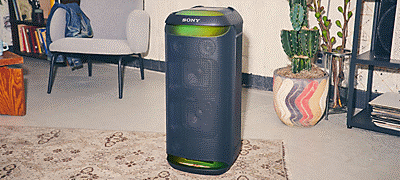
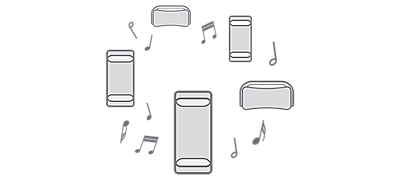
Omni-directional Party Sound carries powerful sound to every corner of the room. Five tweeters deliver clear sound to both the front and rear of the speaker. Plus, it’s all backed up with punchy bass you can feel, thanks to dual X-Balanced Speaker Units. This rich sound experience can be enjoyed wherever you like with the XV800’s longer battery life, and built-in handle and wheels.
Powerful sound with X-Balanced Speaker Unit
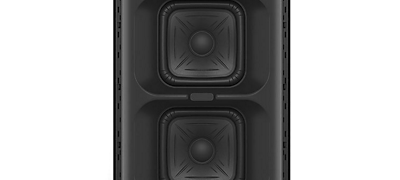
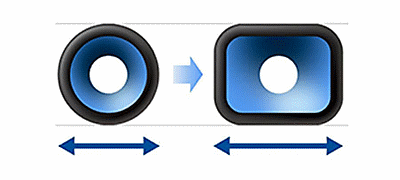
Our X-Balanced Speaker Unit features an almost rectangular diaphragm, for an increased surface area compared to conventional speaker units. The 170 mm x 170 mm large woofer unit gives clear and deep bass sound.
A richer, clearer, deeper experience
The non-circular diaphragm not only maximises the area of speaker diaphragm, but it also increases sound pressure for deeper and punchier bass, less distortion and greater vocal clarity. For a richer, clearer, and more rewarding listening experience.
High quality sound from every angle
The design of the X-Balanced Speaker Unit produces deep, powerful bass and vocal clarity, even when you turn up the volume. Five tweeter units in the front and rear deliver clear high-frequency sound all around.
Give your bass a boost
Give your bass game a boost and listen to your favourite tracks with the power they deserve.
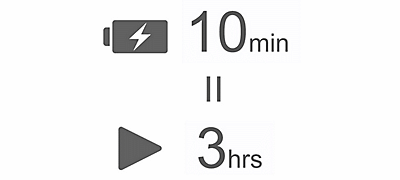
Get the party started in just 10 minutes
With the XV800’s quick charging, you can get 3 hours of playing time with just 10 minutes of charging.
Take care of your battery
With the Battery Care function, you never have to worry about overcharging your speaker, making it more dependable for longer.
Big sound on the move
Whenever you want to move the XV800, take hold of the convenient carry handle and tilt it back. Built-in wheels let you roll all the way to the party.
Light up with ambient illumination
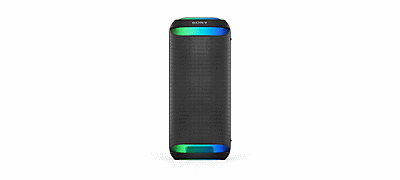
Indirect illumination produces ambient light, so you can light up your room in a way that matches your unique style.
Boosting up live performance
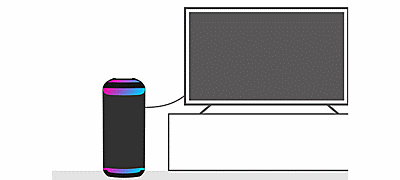
Sony's unique function, TV Sound Booster, lets you enjoy the enhanced sound of audio-visual contents, such as live performance videos and movies, when placing the unit vertically. Owing to the deep bass and realistic high-frequency sound spread, you can get a true audio-visual experience that draws you right into everything you're watching.The XV800 ramps up your TV sound with its 17 cm (6 3/4 in) X-Balanced Speaker Unit, while tweeters on the rear fill the room.
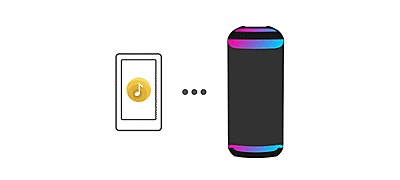
Activate "TV Sound Booster" in the Sony | Music Center app
Switch on "TV Sound Booster" in the Sony | Music Center app.
Activate the sound of XV800 and TV
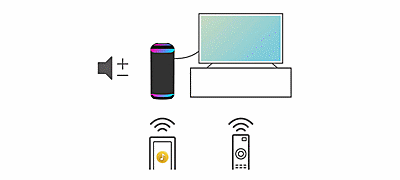
1. Play content on TV.2. Adjust the TV volume using its remote control so that you can hear voice or dialogue.3. Adjust the volume of the XV800 from the Music Center so that the bass sound is as loud as you like.
How the TV Sound Booster works
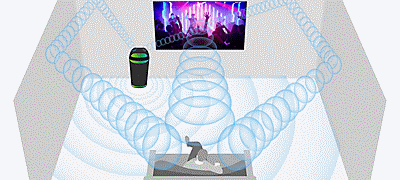
A powerful combination of TV sound and the XV800's two rear tweeters and dual X-Balanced Speaker Unit will provide you with an upgraded TV sound, whatever you watch.
A portable, plug-in party-starter
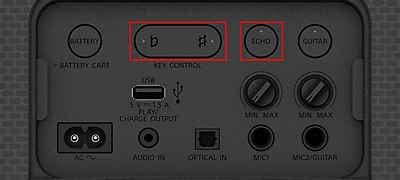
Love karaoke? Then you and the XV800 will make the perfect double act. This portable party speaker has a karaoke input, meaning you just plug in your microphone, pick a song, and you’ll immediately enjoy features including Echo and Key Control on the rear panel of the unit. With two inputs, you can even plug in a guitar and use the speaker as an amp.
Inputs and settings in one place
It's even easier to enjoy karaoke now that the inputs and controls, including Echo and Key Control, are located together on the rear panel.
Stay in control of your settings
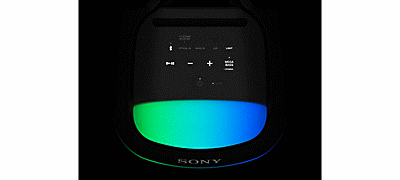
Take control of your modes, settings, and lighting with the easy-to-use touch panel. It’s intuitive and conveniently illuminated, so you can command the party even in a dark environment.
Don't stop your party
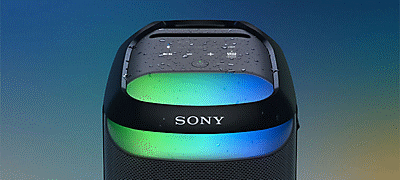
If the forecast isn’t looking good, you don’t have to worry. The XV800 has an IPX4 water resistant rating when upright and an IPX2 rating horizontally, so you can play outside with confidence, even if a few raindrops fall.
Up or down? The choice is yours
The XV800 provides a powerful sound whether it’s positioned vertically or horizontally. A sensor will read the layout and adjust the settings automatically, so you’ll get the best sound, without any fuss.
Party Connect
Connect with up to 100 compatible speakers and sync your music and lights to make sure everyone's dancing to the same beat.
USB Play, and charge devices
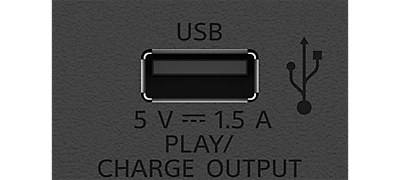
Plug in and play music with USB connectivity, and you can use the XV800 to charge up your other devices.
Sony | Music Center
Optimise audio settings, select playlists, and control Party Connect. Manage your devices right from your phone with the Sony | Music Center app.
Fun features with Fiestable
Control fun features, such as DJ Control and the lighting function, from your phone with this app.
Aiming to achieve a zero environmental footprint
Inspired by the beauty of the world, we are doing our part to help preserve the Earth while still offering superior sound quality and listening experience. With a goal of achieving a zero environmental footprint across the entire Sony Group by the year 2050, we are accelerating numerous initiatives for the environment.
Sustainability in mind
Our products are designed not only to pursue sound quality, but also to consider the environment. Sony's originally developed recycled plastic is used on most of the external and internal parts of the XV800. This reflects how Sony strives to reduce the environmental impact of our products.
-
Specifications
Sound
SPEAKER TYPE2-way, bass reflex
NUMBER OF SPEAKERTweeter Unit: 3, Woofer Unit: 2, Rear Tweeter Unit: 2
SPEAKER SIZETweeter Unit: Approx.60mm,Woofer Unit: Approx. 170-170mm,Rear Tweeter Unit: Approx. 40mm
X-BALANCED SPEAKER UNITWoofer Unit
SOUND MODESClear Audio+,MEGA BASS,Volume Step 51,DSEE,custom EQ band 3,LIVE SOUND,TV Sound Booster
Size & Weight
DIMENSIONS (W X H X D)Approx. 317mmx720mmx375mm
WEIGHTApprox. 18.5 kg
Bluetooth
COMMUNICATION SYSTEMVersion 5.2
COMPATIBLE PROFILESInterface (A2DP) ,Interface (AVRCP) ,Interface (SPP)
SPEAKER ADD FUNCTIONStereo Pair,Party Connect
SUPPORTED CODECSSBC,AAC,LDAC
FREQUENCY TRANSMISSION RANGE20 Hz - 20,000 Hz (44.1 kHz sampling)
FREQUENCY RANGE2.4GHz
Interface
INPUT AND OUTPUT TERMINALSStereo Mini Jack (IN) ,USB A,Optical Digital Input,Mic input,Guitar / MIC Input
Application
COMPATIBLE SMARTPHONE APPSSony | Music Center / Fiestable
General Features
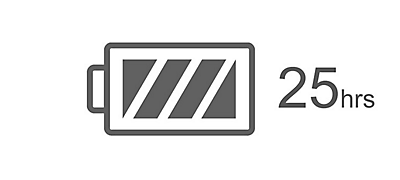
BATTERY LIFEApprox.25H
POWER SUPPLYAC 120-240V, 50/60Hz, Internal rechargeable
USB POWER PORT FOR SMARTPHONEUSB A (5V 1.5A)
POWER CONSUMPTIONApprox. 77W
WATER PROTECTIONIPX4 (when placed,vertically) ,IPX2 (when placed horizontally)
Eco and energy saving
POWER CONSUMPTION (OFF MODE)0.5W
POWER CONSUMPTION (NETWORKED STANDBY MODE) – TERMINALS2.0W (Bluetooth)
-
Highlight
Omni-directional sound for better sound spread
Sound2-way, bass reflex
X-Balanced Speaker Unit for powerful sound
Size & WeightApprox. 317mmx720mmx375mm
25 hour battery life and quick charging
BluetoothVersion 5.2
TV Sound Booster for enriching TV sound
InterfaceStereo Mini Jack (IN) ,USB A,Optical Digital Input,Mic input,Guitar / MIC Input
Karaoke and guitar input for more fun
ApplicationSony | Music Center / Fiestable
-
Support
-
Overview
-
Overviewลำโพงไร้สายที่ทรงพลังนี้จะให้คุณสมบัติที่สมดุลเพื่อให้ตรงกับทั้งความต้องการของปาร์ตี้หรือความบันเทิงของคุณ ในปาร์ตี้ คุณจะสนุกไปกับเสียงปาร์ตี้รอบทิศทาง คาราโอเกะและการควบคุมแบบสัมผัสที่ใช้งานง่าย และที่บ้าน คุณจะยกระดับความบันเทิงได้ด้วย TV Sound Booster
-
-
Online Shopping FAQ
-
Online Shopping FAQ
Questions about your Account
Q. What is a Sony Store account?
A. Your Sony Store account qualifies you for membership with the My Sony program, and upon purchasing THB 5,000 in a month, you will also automatically qualify for the Sony Store Members program. Your account is what you use to sign in to Sony online services such as buying products online, lodging a product support request, receiving emails, participating in competitions or events and providing feedback about your products or these services. It makes your experiences with Sony more personal and relevant to you.
Q. How do I sign up for an account?
A. It is a free and easy process. Simply visit our registration page, key in your particulars and click on “Sign Up” to register. Please ensure that we give absolute priority to the security of your personal and financial information. For more details, please refer to our Privacy Policy.
Q. How do I log into my account?
A. Please visit our sign in page, key in your registered email address and password, and you are logged in. Forgot your password? No worries, click the forgot password option and follow the prompts.
Q. How can I change my registered email address?
A. Please log in to your existing account and click on “Edit Profile” to update your details.
Q. How do I reset my password?
A. Forgot your password? No worries, simply visit our login page, click the forgot password option and follow the prompts to reset your password. You may also log in to your existing account and click on “Edit Profile” to reset your password.
Q. What are some tips about passwords, privacy and safety?
A. Here is some information about passwords and privacy.
To keep your account safe, we recommend a series of password strengthening measures. Your password will need to be:
- 8 to 20 characters long
- One lower case letter
- One upper case letter
- One number
- One special character
- No spaces
Tips for your personal safety:
- Don’t use personal information or common words as a password
- Keep your passwords secure
Q. What can I save in my Account?
A. Currently you can save your favourite details such as delivery addresses and wishlist to make your online purchase easier. If you do not mind filling in further details of your advanced profile settings, we would be better able to deliver a customized experience to you based on your needs & wants.
Q. Can I save my delivery addresses?
A. Yes! You can save your preferred delivery addresses in your account section. Prefer a gift to be delivered to your home address? Or, headphones delivered straight to your workplace? It's easy! Simply keep these details saved to your account to help you speed through the checkout process.
Q. Can I save my contact details?
A. Yes! Your own account section will keep all your details in one place, so you can find them at your fingertips. Should you need to edit any details, click on “Edit Profile” to update your details.
Q. Is my information secure?
A. Absolutely, best practices have been used to make sure your information is secure at all times. Kindly refer to our privacy policy for more details.
Questions about your Orders
Q. How do I know if my purchase has been confirmed?
A. Upon confirmation of your order, you will receive a confirmation email with the order number. Should you not receive this email confirmation, please contact us for more assistance.
Q. Can I see the status of my order in My Account?
A. Absolutely! Simply log in to your account and check out your existing orders under the “My Orders” section. Orders that have been shipped out will have a tracking number available.
Q. How do I track my order?
A. When your order has been shipped out, you will receive an email with your tracking number and order number, so keep an eye on your inbox. You may also get a call from our delivery team. Should there be any questions, please contact us and provide us with your tracking and order numbers.
Q. How do I add items to my cart?
A. Simply find the product that you wish to purchase and use the "Add to Cart" button. Items that are sold out may not be able to be purchased and will display a "Sold Out" badge. You can also proceed to your cart and update the quantities, or remove items, from your order.
Questions about Payment
Q. What payment methods are accepted?
A. To bring you the best online shopping experience, we offer multiple payment methods:
- Credit Card
- Debit Card
- 0% Installment Payment Plan (applicable for SCB Bank, Krungsri Bank, KTC and Bangkok Bank currently)
- iBanking
- Bank Transfer
Q. Will I receive communication of my payment status?
A. An email notification on whether your payment was successful will be sent to you once your order has been confirmed and verified.
Q. Will my credit card details be stored in My Account?
A. As we give absolute priority to the security of your personal and financial information, we do not request for you to store your credit card details nor do we store them.
Q. Which credit cards are accepted for payment?
A. Sony Store, Online accepts all major credit cards supported by VISA and MasterCard.
Questions about Returns & Refunds
Q. Can I change/return my purchased product?
A. Should you not be satisfied with the purchased product or you've received your order wrongly, please check out the returns process below:
- All products must be purchased from Sony Store Online (Thailand). Receipt / tax invoice with the trackable order number is required.
- Returns and/or exchanges are only available for products that are deemed to be damaged in transit (ie: before you received it). In case of defective or out of order goods, goods return must be done within 7 days of receiving. After 7 days, goods return will not be accepted.
- Products must be returned in the original packaging, and should include any free gifts, warranties, manuals, and other accessories that came together with your item.
- Shipping and handling fees cannot be refunded unless a replacement item is shipped out due to being damaged in transit, or faulty when opened.
- In case of refund, it will be based on value of the product at the date of sale only (per the price on the receipt).
REMARKS: The company reserves the right to refuse any goods return or refund if the case does not meet the above requirements.
Q. How soon can Sony process my return request?
A. You will receive a response from Sony within 3 working days.
Q. How do I get a refund?
A. If deemed faulty or damaged before you received your order, Sony will happily replace your purchase with a new item. No additional shipping charges will be added to your order and we’ll help arrange for the replacement to be shipped back to us.
If you would prefer us to refund you, please contact us within 7 days after you've received the product to provide us the details for refund according to Sony's terms and conditions.
For items where an incorrect colour, style or model has been delivered, as long as the item is in its original packaging, Sony will provide an exchange. No exchange will be issued until the item has been returned and inspected, according to Sony’s return policy.
Q. What if I change my mind?
Please choose carefully as refunds and returns are not provided for change of mind.
Q. Will my redeemed points be refunded if I cancel my order?
A. The redeemed points of your purchase will be fully refunded to your member account when the products and services are cancelled. Terms and conditions apply.
Questions about Delivery
Q. How much does delivery cost?
A. For any purchase from Sony Store Online (Thailand) of 2,000 baht and above, delivery fee is FREE regardless of the size of the item, be it TV or an audio device.
Q. Can I get my delivery left at my doorstep or hidden somewhere at the door?
A. To ensure that you get the parcel safely and to avoid any damages to your parcel while it is left unattended, we require a signature when our friendly delivery team comes to your house.
Q. Do you ship overseas?
A. Shipping is only available to customers within Thailand only.
Q. What is the expected delivery time?
A. We are usually able to dispatch your items within 3 working days, if items are in-stock and fully paid. Orders received on Saturday and Sunday may take longer as it will only be processed on the next working day.
During sale/promotion period, we may experience a huge influx of orders which may mean a delay. Please allow us to dispatch your items usually within 5 working days.
REMARKS: Should payment not be cleared, there may be a delay on delivery of your order.
Q. What notifications will I get about delivery?
A. Tracking and order numbers will be provided to the email address registered in your account.
Q. What should I do if I have not received my item?
A. Please contact us and provide us with your tracking and order number.
Q. I ordered multiple items, but I only received partially. Where are my other items?
A. Please contact us and provide us with your tracking and order number.
Q. Can I prearrange the date I want to receive my delivery?
A. We apologize that we are unable to accommodate specific delivery time requests at the moment. If you are not available at the time of your delivery attempt, our delivery team will try to re-deliver to you at another time. However, in the case of more than 2 unsuccessful delivery attempts, shipping fee will be charged for the next attempt.
Q. Do you deliver during weekends and holidays?
A. Our delivery team may attempt deliveries during the weekend, and on some holidays. However, if you are not available at the given address on the weekend, please contact the delivery staff who would have contacted you before the parcel is delivered.
Q. I have already ordered but need my order now, can Sony speed up the delivery?
A. Unfortunately, we are unable to expedite the delivery of orders. However, we will in our best effort deliver your parcel within the indicated delivery time.
Q. Can Sony deliver the items to my office?
A. Yes, we will deliver your order to the address you provided during checkout, regardless whether it is your home address or office address, as long as it is within Thailand.
Q. What if I am not at home when the package arrives?
A. If you’re unavailable to receive your package when it arrives, the delivery team will attempt to re-deliver it to you on the next working day. Please note that it is currently not possible to request for a specific delivery day and/or timing (even for re-deliveries).
Q. My goods were damaged while being delivered, what do I do?
A. We understand the disappointment in opening a new product only to see it broken. Please refuse to accept the product from the delivery staff immediately once you notice that the product packaging has some defects and please contact us right away.
Questions about your Wishlist
Q. What is my Wishlist?
A. Your wishlist allows you to save and share your favourite Sony products to view and purchase later.
Q. How do I view or use my Wishlist?
A. In your account section, you will be able to save your favourite Sony products by clicking on the “heart-shaped” icon. This feature will make it easy to shop and come back to your favourites later.
Questions about Products
Q. How do I get my product repaired?
A. You may return goods we have delivered to you for repair by contacting our service team here. We understand that sometimes large items (TVs & stereos) cannot be shipped easily so our service team will happily arrange an inspection.
Sony will assess and repair products within a reasonable time. This time frame will be communicated via the service team but may vary due to part availability or fault diagnosis. Where possible, all fees (labour, freight, assessment) will be communicated for purchases not covered by manufacturer’s warranty. Where a fault is not found, there may be a service fee involved.
Q. What happens to my data on a product that is repaired?
A. Please ensure, where possible, all data is backed up on recordable media (flash drives, computer hard drives, camera memory cards, mobile phone contacts. Depending on repair requirements, some data may be lost. Sony is not liable for any data not backed up.
Q. Are these products locally sourced, or parallel imported?
A. All products sold through Sony Thai Co., Ltd. are authentic and sold directly from the manufacturer and are not parallel imports.
Questions about Coupon Codes
Q. Can I use multiple coupon codes on the same order?
A. You are only able to key in one coupon code per order.
Q. How long is the coupon code valid for?
A. It varies. The expiration date of the coupon code will usually be indicated and communicated clearly.
Q. Can I use a coupon code for my existing order?
A. We are unable to apply coupon codes for existing orders. Coupon codes must be entered when you are at Payment step during checkout.
Q. Can I redeem my Sony Store loyalty points together with the coupon code in the same order?
A. Yes, you can redeem the Sony Store loyalty points together with the use of a coupon code for the same order. Before the checkout process, you will be asked to key in the number of loyalty points to redeem. Then during checkout, you will be asked to key in the coupon code.
Q. Why do I get a message saying my coupon code is invalid?
A. Each coupon code has its own terms and conditions. Please make sure your coupon code is still valid and meet the terms and conditions.
Q. What happens if my coupon code has expired?
A. Once the coupon code has expired, it is no longer valid.
Other commonly-asked Questions
Q. How do I close my account?
A. By choosing to close your account you will terminate your account, membership, exclusive offers and will stop receiving communications with offers, product updates, news, information and member only event invitations.
To terminate your account, log in to your current account and follow the prompts.
Q. How do I unsubscribe?
A. You can unsubscribe from all communications from Sony Thai Co., Ltd. (emails, SMS, direct mail etc.) by changing your subscription preferences here. You will stop receiving communications with offers, product updates, news, information and member only event invitations. Your order details, product registrations and account details will still be available to you.
-
-
Features
-
Features
Fill your venue with Omni-directional Party Sound
Omni-directional Party Sound carries powerful sound to every corner of the room. Five tweeters deliver clear sound to both the front and rear of the speaker. Plus, it’s all backed up with punchy bass you can feel, thanks to dual X-Balanced Speaker Units. This rich sound experience can be enjoyed wherever you like with the XV800’s longer battery life, and built-in handle and wheels.
Powerful sound with X-Balanced Speaker Unit
Our X-Balanced Speaker Unit features an almost rectangular diaphragm, for an increased surface area compared to conventional speaker units. The 170 mm x 170 mm large woofer unit gives clear and deep bass sound.
A richer, clearer, deeper experience
The non-circular diaphragm not only maximises the area of speaker diaphragm, but it also increases sound pressure for deeper and punchier bass, less distortion and greater vocal clarity. For a richer, clearer, and more rewarding listening experience.
High quality sound from every angle
The design of the X-Balanced Speaker Unit produces deep, powerful bass and vocal clarity, even when you turn up the volume. Five tweeter units in the front and rear deliver clear high-frequency sound all around.
Give your bass a boost
Give your bass game a boost and listen to your favourite tracks with the power they deserve.
Get the party started in just 10 minutes
With the XV800’s quick charging, you can get 3 hours of playing time with just 10 minutes of charging.
Take care of your battery
With the Battery Care function, you never have to worry about overcharging your speaker, making it more dependable for longer.
Big sound on the move
Whenever you want to move the XV800, take hold of the convenient carry handle and tilt it back. Built-in wheels let you roll all the way to the party.
Light up with ambient illumination
Indirect illumination produces ambient light, so you can light up your room in a way that matches your unique style.
Boosting up live performance
Sony's unique function, TV Sound Booster, lets you enjoy the enhanced sound of audio-visual contents, such as live performance videos and movies, when placing the unit vertically. Owing to the deep bass and realistic high-frequency sound spread, you can get a true audio-visual experience that draws you right into everything you're watching.The XV800 ramps up your TV sound with its 17 cm (6 3/4 in) X-Balanced Speaker Unit, while tweeters on the rear fill the room.
Activate "TV Sound Booster" in the Sony | Music Center app
Switch on "TV Sound Booster" in the Sony | Music Center app.
Activate the sound of XV800 and TV
1. Play content on TV.2. Adjust the TV volume using its remote control so that you can hear voice or dialogue.3. Adjust the volume of the XV800 from the Music Center so that the bass sound is as loud as you like.
How the TV Sound Booster works
A powerful combination of TV sound and the XV800's two rear tweeters and dual X-Balanced Speaker Unit will provide you with an upgraded TV sound, whatever you watch.
A portable, plug-in party-starter
Love karaoke? Then you and the XV800 will make the perfect double act. This portable party speaker has a karaoke input, meaning you just plug in your microphone, pick a song, and you’ll immediately enjoy features including Echo and Key Control on the rear panel of the unit. With two inputs, you can even plug in a guitar and use the speaker as an amp.
Inputs and settings in one place
It's even easier to enjoy karaoke now that the inputs and controls, including Echo and Key Control, are located together on the rear panel.
Stay in control of your settings
Take control of your modes, settings, and lighting with the easy-to-use touch panel. It’s intuitive and conveniently illuminated, so you can command the party even in a dark environment.
Don't stop your party
If the forecast isn’t looking good, you don’t have to worry. The XV800 has an IPX4 water resistant rating when upright and an IPX2 rating horizontally, so you can play outside with confidence, even if a few raindrops fall.
Up or down? The choice is yours
The XV800 provides a powerful sound whether it’s positioned vertically or horizontally. A sensor will read the layout and adjust the settings automatically, so you’ll get the best sound, without any fuss.
Party Connect
Connect with up to 100 compatible speakers and sync your music and lights to make sure everyone's dancing to the same beat.
USB Play, and charge devices
Plug in and play music with USB connectivity, and you can use the XV800 to charge up your other devices.
Sony | Music Center
Optimise audio settings, select playlists, and control Party Connect. Manage your devices right from your phone with the Sony | Music Center app.
Fun features with Fiestable
Control fun features, such as DJ Control and the lighting function, from your phone with this app.
Aiming to achieve a zero environmental footprint
Inspired by the beauty of the world, we are doing our part to help preserve the Earth while still offering superior sound quality and listening experience. With a goal of achieving a zero environmental footprint across the entire Sony Group by the year 2050, we are accelerating numerous initiatives for the environment.
Sustainability in mind
Our products are designed not only to pursue sound quality, but also to consider the environment. Sony's originally developed recycled plastic is used on most of the external and internal parts of the XV800. This reflects how Sony strives to reduce the environmental impact of our products.
-
-
Specifications
-
Specifications
Sound
SPEAKER TYPE2-way, bass reflex
NUMBER OF SPEAKERTweeter Unit: 3, Woofer Unit: 2, Rear Tweeter Unit: 2
SPEAKER SIZETweeter Unit: Approx.60mm,Woofer Unit: Approx. 170-170mm,Rear Tweeter Unit: Approx. 40mm
X-BALANCED SPEAKER UNITWoofer Unit
SOUND MODESClear Audio+,MEGA BASS,Volume Step 51,DSEE,custom EQ band 3,LIVE SOUND,TV Sound Booster
Size & Weight
DIMENSIONS (W X H X D)Approx. 317mmx720mmx375mm
WEIGHTApprox. 18.5 kg
Bluetooth
COMMUNICATION SYSTEMVersion 5.2
COMPATIBLE PROFILESInterface (A2DP) ,Interface (AVRCP) ,Interface (SPP)
SPEAKER ADD FUNCTIONStereo Pair,Party Connect
SUPPORTED CODECSSBC,AAC,LDAC
FREQUENCY TRANSMISSION RANGE20 Hz - 20,000 Hz (44.1 kHz sampling)
FREQUENCY RANGE2.4GHz
Interface
INPUT AND OUTPUT TERMINALSStereo Mini Jack (IN) ,USB A,Optical Digital Input,Mic input,Guitar / MIC Input
Application
COMPATIBLE SMARTPHONE APPSSony | Music Center / Fiestable
General Features
BATTERY LIFEApprox.25H
POWER SUPPLYAC 120-240V, 50/60Hz, Internal rechargeable
USB POWER PORT FOR SMARTPHONEUSB A (5V 1.5A)
POWER CONSUMPTIONApprox. 77W
WATER PROTECTIONIPX4 (when placed,vertically) ,IPX2 (when placed horizontally)
Eco and energy saving
POWER CONSUMPTION (OFF MODE)0.5W
POWER CONSUMPTION (NETWORKED STANDBY MODE) – TERMINALS2.0W (Bluetooth)
-
-
Highlight
-
Highlight
Omni-directional sound for better sound spread
Sound2-way, bass reflex
X-Balanced Speaker Unit for powerful sound
Size & WeightApprox. 317mmx720mmx375mm
25 hour battery life and quick charging
BluetoothVersion 5.2
TV Sound Booster for enriching TV sound
InterfaceStereo Mini Jack (IN) ,USB A,Optical Digital Input,Mic input,Guitar / MIC Input
Karaoke and guitar input for more fun
ApplicationSony | Music Center / Fiestable
-
-
Support
-
Support
-

ลำโพงปาร์ตี้ไร้สาย XV800 X ซีรีส์
19,990 THB
- Overview
- Online Shopping FAQ
- Features
- Specifications
- Highlight
- Support